
Campaign engine
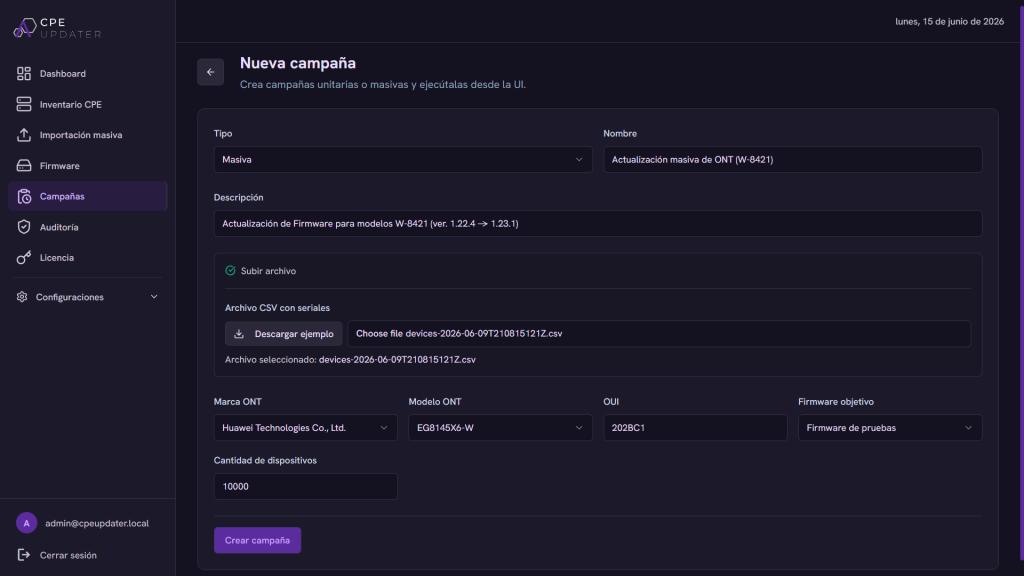
Plan, schedule and run firmware campaigns with batches, intervals and rate limits.
Actuskom CPE Updater
Plan, launch, monitor and verify firmware campaigns across thousands of devices with visibility, rate limits, auditability and secure integrations.
The problem
Updating thousands of CPE and ONT devices with scripts and spreadsheets means slow rollouts, inconsistent versions and no clear answer when something breaks. CPE Updater replaces that with a single control plane — campaigns, device data, firmware delivery and audit in one place.
Sync devices and parameters from your ACS so every model and firmware version is visible in one inventory.
Target devices by model, group or current version and select the firmware image to deploy.
Configure batch sizes, intervals and rate limits so updates roll out in controlled waves, never all at once.
Queued jobs run in the background while you watch live status, with automatic pausing when error rates spike.
Confirm the resulting firmware on each device and export the full result set as a CSV report.
Plan, schedule and run firmware campaigns with batches, intervals and rate limits.
A live view of every CPE/ONT, its model, status and current firmware version.
Store and version firmware images, served to devices through Nginx delivery.
Real-time campaign progress with success, error and in-progress states per device.
Export campaign and device results as CSV reports for analysis and record-keeping.
Role-based access with JWT authentication and a complete audit log of every action.
Campaign management
Campaigns are processed through BullMQ and Redis queues, so large deployments run reliably in the background and survive restarts. You decide how aggressive each rollout is.
Device & firmware management
CPE Updater reads device data over TR-069 using the TR-098 and TR-181 data models, then matches each device to the right firmware image from your repository.
Integrations
CPE Updater connects to your provisioning stack rather than replacing it, so you keep the tooling your team already runs.
Talks to GenieACS over its API (NBI) to read devices and trigger TR-069 operations.
Uses the TR-069 protocol with TR-098 and TR-181 data models for device parameters and updates.
Serves firmware images to devices through Nginx for fast, reliable distribution.
Export results as CSV and drive campaigns programmatically through the platform API.
Access is authenticated with JSON Web Tokens and scoped by role-based permissions.
Device and integration credentials are stored encrypted with AES-256-GCM.
Every campaign, change and login is logged and attributable for complete traceability.
Rate limits, batching and auto-pause keep risky updates contained before they spread.
CPE Updater licensing depends on the number of devices and the specific needs of your operation. To provide an accurate quote, our team needs to understand your network, deployment requirements and support expectations.
The best next step is to schedule a demo so we can review your use case and recommend the right licensing approach.
Faster
rollouts across thousands of devices
Lower
operational overhead and manual work
Safer
deployments with limits and auto-pause
Auditable
history for every action and change
CPE Updater works with CPE and ONT devices over TR-069, using the TR-098 and TR-181 data models. Share your hardware and ACS setup and we'll confirm coverage in a demo.
Yes. It integrates with GenieACS through its API (NBI) to read devices and trigger TR-069 operations, and serves firmware via Nginx delivery.
Campaigns run through BullMQ/Redis queues with configurable batches, intervals and rate limits, plus automatic pausing and retries when error rates rise.
Access uses JWT authentication with role-based permissions, credentials are encrypted with AES-256-GCM, and every action is recorded in an audit log.
Yes. Campaign and device results can be exported as CSV reports for analysis, compliance and record-keeping.
CPE Updater licensing depends on the number of devices and the specific needs of your operation. Contact us for a demo so we can review your use case and recommend the right approach.
Tell us about your fleet — device models, rough device count and your current ACS — and we'll show you CPE Updater in action.